
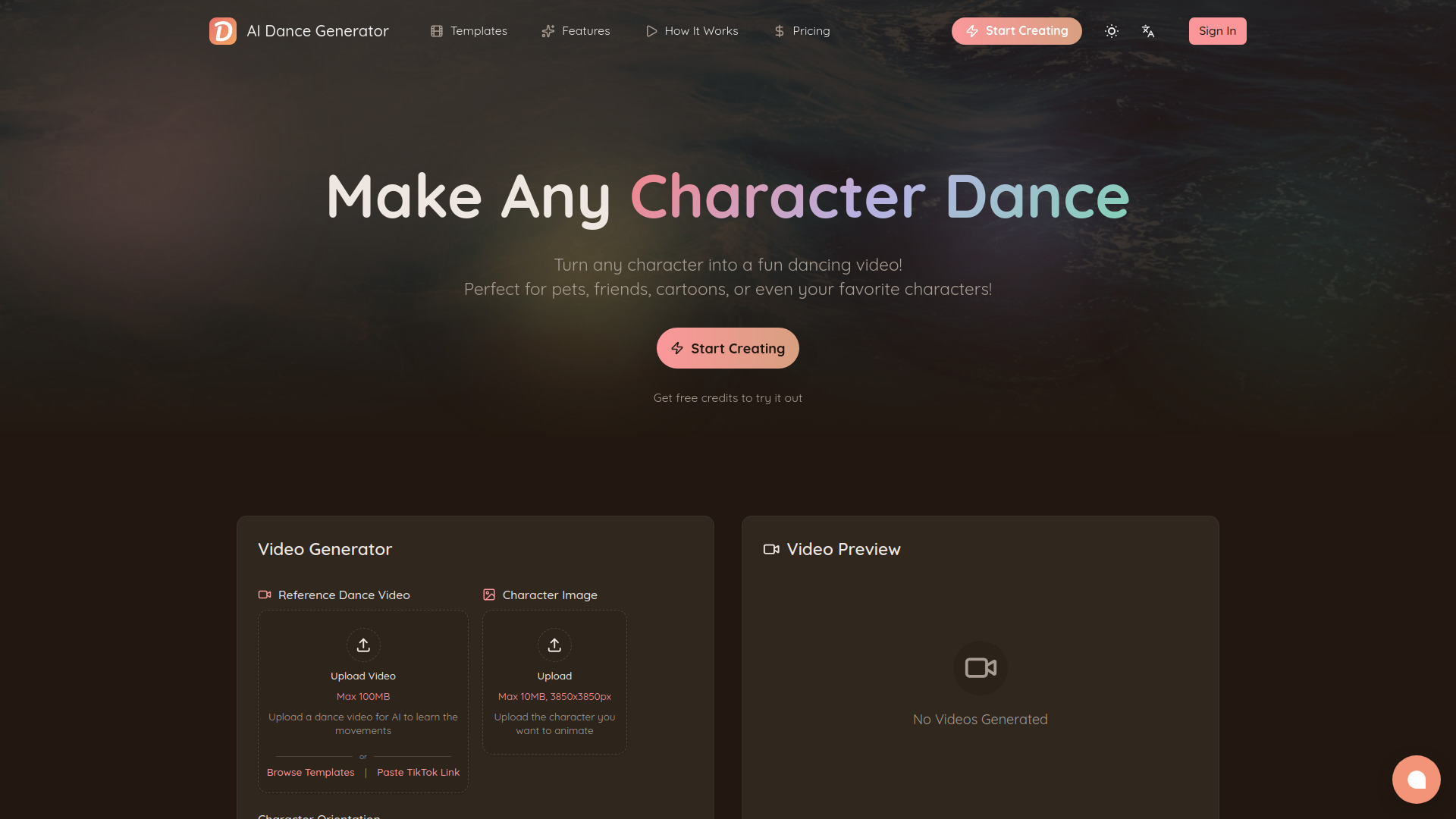
AI Dance Generator is an online AI-powered tool that creates dancing videos from a single image. It uses advanced frame-by-frame motion transfer technology to apply dance movements from a reference video onto any character you upload, producing natural, fluid dancing animations with remarkably precise hand and finger details. Unlike traditional video editing software that demands hours of manual work, motion capture equipment, or animation expertise, AI Dance Generator distills the entire process into three dead-simple steps that anyone can complete in under a minute.
Step one is picking a dance reference, with three flexible options. Built-in Dance Templates let you browse a growing collection of curated templates in various styles, durations, and orientations, organized by categories such as dance style, character type, video duration, and music genre, so you can quickly find the perfect reference without searching for videos yourself — just filter, browse, and pick. Prefer a trending dance? Simply copy the video URL from TikTok, Instagram, YouTube, or other major platforms and paste it directly into the generator; the AI automatically extracts the dance movements from the video and uses them as the reference. Or, if you have a specific dance clip you love, upload any short dance video clip and the AI will learn the moves from it.
Step two is uploading a character image: a clear, full-body, front-facing picture in JPG or PNG format, up to 10MB and a maximum resolution of 3850×3850 pixels. You can upload a new image or pick one from your personal Character Library — a saved collection of your previously uploaded characters so you never have to re-upload the same image twice. The range of supported characters is incredibly wide: real people (selfies, portraits, fashion photos), pets and animals such as dogs and cats, anime and manga characters, illustrated and hand-drawn characters, 3D rendered models and CGI characters, cartoon and comic book characters, historical figures, memes, brand mascots — virtually anything with a visible full body.
Step three is generating and downloading: hit the "Generate Video" button and wait a few minutes. The AI processes your inputs and produces a high-definition video that is immediately ready to download and share on any social media platform.
What makes AI Dance Generator different? Simplicity is the core value. While there are other AI video tools on the market, AI Dance Generator is purpose-built for one thing — making characters dance — and it does that one thing exceptionally well with the least amount of friction possible. Multi-Platform Video Link Support is a major differentiator: most AI video tools require you to manually prepare reference videos, but AI Dance Generator lets you paste a video URL from TikTok, Instagram, YouTube, and other major platforms directly, bridging the gap between discovering a trending dance and recreating it with your own character. This is especially powerful for content creators who want to jump on viral dance trends quickly.
Browser Extensions for Social Media take the integration even further. The free AI Dance Generator Helper browser extension (available for Chrome, Edge, and Firefox) automatically detects dance videos on the page while you browse social media platforms like TikTok and lets you send any video to DanceGenerator.AI with a single click. No need to manually copy URLs — just browse your favorite platform, see a dance you like, click the extension button, and your reference video is ready. Additional platform-specific extensions are being developed to provide the same seamless experience across more social media platforms.
The Character Library saves your uploaded character images to your personal library so you can reuse them across multiple video generations. No need to re-upload the same images every time — just pick a character from your saved collection and start creating. This is especially useful for creators who frequently animate the same characters, brand mascots, or personas. For developers, automation enthusiasts, and businesses, AI Dance Generator offers a full REST API for programmatic access to all generation features, so you can integrate AI dance video generation directly into your own applications, websites, marketing automation workflows, or content pipelines. It additionally provides an MCP (Model Context Protocol) server, enabling seamless integration with AI agents, chatbots, and LLM-powered tools — so you can build AI-native workflows that include dance video generation as a capability.
Motion quality is another standout. The underlying AI produces frame-by-frame motion transfer with precise hand and finger details, avoiding the common "AI blurry hands" problem seen in many competitors, and videos can be generated in extended continuous lengths without quality degradation.
Who is it for? Content creators and influencers can quickly create engaging dance content for TikTok, Instagram Reels, and YouTube Shorts without needing to actually dance themselves. Social media managers can produce fun, shareable branded content that drives engagement and virality. Digital artists and illustrators can bring their illustrated or anime characters to life with realistic dance animations. Marketing teams can create eye-catching promotional videos for campaigns, product launches, and brand awareness. Developers and automation builders can use the REST API or MCP server to integrate dance video generation into their apps, bots, workflows, and AI agent pipelines. And casual users can make their pets dance, create funny videos of friends, or animate memes — just for the fun of it.
Output quality and format: videos are delivered in high definition, universally compatible with all social media platforms, with extended continuous generation that shows no quality degradation. Both portrait (9:16, ideal for TikTok and Reels) and landscape (16:9) orientations are supported, depending on your reference video.
Pricing uses a credit-based system, with credits consumed based on video duration at a rate of 7 credits per second. New users receive free credits upon registration — no credit card required — letting you test the tool and see the quality before committing. One-Time Credit Packs require no subscription: the Starter Pack costs $14.99 for 500 credits (about 7 videos of 10 seconds), the Growth Pack costs $49.99 for 2,000 credits (about 28 videos of 10 seconds) and includes commercial usage rights, and the Pro Pack costs $99.99 for 5,000 credits (about 71 videos of 10 seconds).
Monthly Subscriptions include Basic at $9.99/month for 500 credits/month, Pro at $39.99/month for 2,500 credits/month with priority queue and early access to new features, and Max at $99.99/month for 8,000 credits/month. Annual Subscriptions save 20%: Basic at $7.99/month ($95.88/year) for 6,000 credits/year, Pro at $31.99/month ($383.88/year) for 30,000 credits/year, and Max at $79.99/month ($959.88/year) for 80,000 credits/year. Paid users enjoy a priority generation queue, and the Pro tier and above get early access to new features and priority customer support. Payment is accepted via Stripe, PayPal, and Creem.
The platform is available in multiple languages — including English, Spanish, French, Japanese, Korean, Portuguese, and Chinese (Simplified), with more being added — making it accessible to a global audience.
Subscribe to get the latest AI Dance Generator | DanceGenerator.AI and global AI updates.


Comments
Loading comments…