
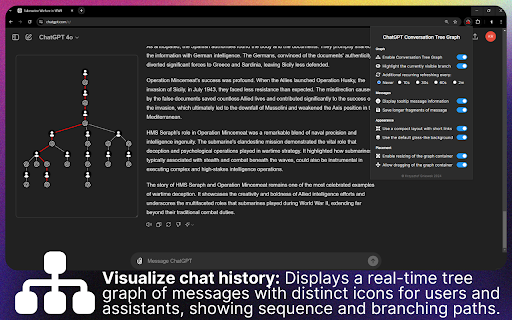
ChatGPT Conversation Tree Extension makes long, branching conversations far easier to follow by displaying a dynamic tree graph of your dialogue in a floating container. You can resize and move this container anywhere on the ChatGPT website, so the overview stays exactly where it works best for you.
The graph visually maps the flow of your conversation, showing the sequence of messages and every branching path they take. When you hover over any node, informative tooltips reveal the message content, its version, and the number of sibling branches, giving you a clear picture of how the conversation evolved and helping you understand even a complexly branched history at a glance.
You can also zoom in and drag the graph itself within the container, allowing detailed exploration of the conversation structure. This is especially valuable for getting oriented when a discussion has split into many directions, whether you are comparing alternative answers or trying to find where an earlier idea diverged.
Behind the scenes, the extension efficiently checks for new messages and updates the tree accordingly, highlighting the branch you are currently viewing. And to avoid wasting resources, it stays idle when there is nothing to track, so you get live structure without unnecessary overhead.
Subscribe to get the latest ChatGPT Conversation Tree Extension and global AI updates.



Comments
Loading comments…